🐸 The Pesky Toad
The Win 10 endgame

Microsoft moved on. Your machine didn't have to.

October 14, 2025: mainstream Windows 10 support ended. Millions of perfectly fine PCs — including classic ThinkPads Microsoft won't bless for Windows 11 — were told to buy new hardware, enroll in Extended Security Updates, or live unprotected. Here are the real options, the numbers, and why Linux Mint Cinnamon is the cleanest exit.

28%
of desktop Windows still on Win 10 (June 2026)
240M
PCs blocked from official Win 11 (Canalys)
8.9
/10 DistroWatch rating for Linux Mint
~5%
Linux on Steam (Mar 2026 peak)

How Microsoft stranded a generation of PCs

Windows 11 didn't just ask for a free upgrade. It drew a hard line: TPM 2.0, Secure Boot, and a short list of approved CPUs. Machines that ran Windows 10 flawlessly for years — classic ThinkPads like the T430 and T530, and hundreds of millions of other workhorses — failed the checklist. Industry estimates put roughly 240 million PCs on the wrong side of that wall.

Mainstream support ended October 14, 2025. No more free security patches unless you jump through Microsoft's Extended Security Updates (ESU) hoop. As of June 2026, StatCounter still shows Windows 10 at about 28% of the desktop Windows market — hundreds of millions of people still living in the afterlife Microsoft designed.

Desktop Windows share · June 2026 (StatCounter)
Windows 1169.9%
Windows 1028.1%
Older Windows~2%

Three exits for a perfectly fine PC

If your machine still boots, types, and browses — you are not broken. You have choices.

Option 01 · Rent time

ESU — stay on Win 10 a little longer

Extended Security Updates keep critical and important patches flowing for enrolled Windows 10 22H2 machines. Microsoft quietly pushed the consumer ESU finish line to October 12, 2027 — another year beyond the original 2026 cutoff. Already enrolled? Coverage rolls forward automatically.

The catch

Enrollment wants a Microsoft account with admin rights. Free paths: turn on Windows Backup (sync settings to their cloud), or burn 1,000 Microsoft Rewards points. Or pay $30 once. EEA users can get it free just by signing in. One license covers up to 10 devices.

Reality check

ESU is not a new Windows. No features, no tech support — security patches only. Lansweeper found only about 14% of remaining Win 10 enterprise assets had ESU patches applied. It is life support, not a future. And the account signup is exactly what Microsoft wanted more than anything.
Option 02 · Force it

Install Windows 11 anyway (unsupported)

Bypass scripts and registry tricks can shove Windows 11 onto hardware that fails TPM / CPU checks. It often boots. Many people do it. Microsoft does not support it.

  • Update roulette: future cumulative updates may refuse, break, or leave you stranded mid-upgrade.
  • Driver & Secure Boot weirdness: especially on older BIOS setups and dual-GPU machines.
  • Still Microsoft: you inherit Win 11's ads, account pressure, and Copilot-everywhere direction — on hardware they told you to landfill.

Fine for experimenters. Fragile as a long-term plan for a daily driver.

Option 03 · Leave · Recommended

Move to Linux. Say bye bye Microsoft.

Your browser, LibreOffice / OnlyOffice, email, Zoom, banking sites, Spotify, Steam + Proton — they all work. You keep the hardware you already paid for. Security updates arrive from the distro, not from a corporate deadline designed to sell you a Copilot+ PC.

For Windows refugees, the softest landing is almost always Linux Mint with the Cinnamon desktop: start menu, taskbar, system tray, right-click desktop — the muscle memory survives.

Who is actually switching — and are they happy?

Nobody has a perfect census of “Windows refugees.” What we do have are converging signals that Linux on the desktop is no longer a punchline — especially after Win 10 EOL and with gaming finally usable via Proton.

Desktop share

StatCounter puts Linux around 3% of global desktops in early 2026 (monthly numbers bounce with “Unknown” traffic). Broader year-end modeling for 2025 landed nearer 4–5%. Slow climb, real climb.

Steam / gaming

Steam's Hardware Survey hit an all-time Linux high of 5.33% in March 2026 — roughly double year-over-year. Deck still matters, but desktop Linux gamers are a growing share of that pie.

Linux Mint reputation

DistroWatch visitor ratings average 8.9 / 10 across 1,000+ reviews. Mint routinely sits #1 or #2 on DistroWatch's hit rankings — the front door for people leaving Windows.

Cinnamon / Windows-like DEs

Industry roundups peg Cinnamon (Mint's flagship DE) near 3.2 million users in 2025, with Windows-migrant UX as the explicit design goal. Zorin OS, elementary, and Kubuntu fill the same “looks like Windows / Mac” niche with similar praise in How-To Geek and forum migrations.

“After daily driving Mint for two weeks, I'm convinced that its user-friendliness, a familiar desktop, and the fact that it just works are why it's the Linux distro everyone recommends as a Windows replacement.”
— How-To Geek, Mint daily-driver review

T430 & T530 + Mint Cinnamon = the Baja daily driver

Microsoft will not bless a ThinkPad T430 or T530 for Windows 11. That does not make them e-waste. Slap in an SSD, max the RAM, load Linux Mint Cinnamon, and you have a tough, repairable writing and browsing machine — without the TPM tax or a Microsoft account.

Transition from Windows 10 is intentionally boring: same bottom panel, same start-style menu, same “open Firefox / open Files / open LibreOffice” muscle memory. Install takes under an hour. You can try Mint from a USB stick without wiping anything first.

  • Email, banking, Google Docs, WhatsApp Web — browser apps, same as Win 10
  • LibreOffice opens your old .docx / .xlsx files
  • Timeshift snapshots = undo button if an update scares you
  • No Microsoft account required. Ever.
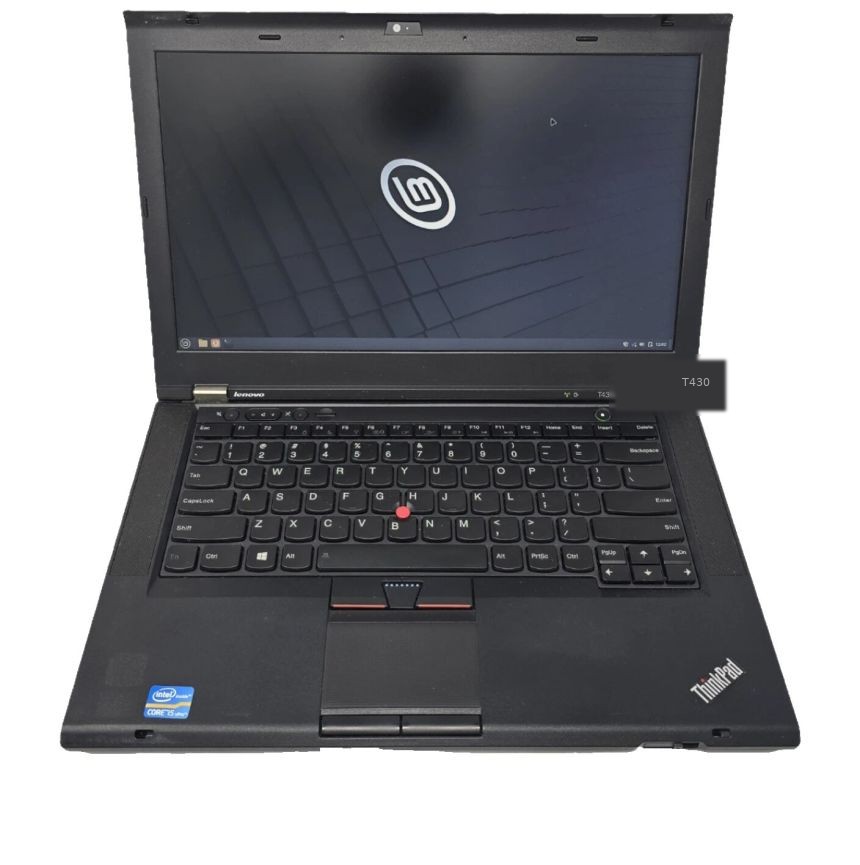
ThinkPad T430 running Linux Mint Cinnamon T430 · Linux Mint · Win11-blocked
[ 14" daily driver ]

ThinkPad T430

The classic 14" workhorse. Ivy Bridge Intel, legendary keyboard, easy RAM/SSD upgrades, and rock-solid Linux support. Microsoft's Health Check says no to Win 11 — Mint says yes. Perfect for email, docs, browsing, and Baja writing sessions.

CPU: Ivy Bridge Screen: 14" OS: Mint Cinnamon
[ 15.6" workspace ]

ThinkPad T530

Same generation, bigger canvas — 15.6" display and room to breathe for spreadsheets, dual windows, and longer writing. Same upgrade path, same Win 11 snub, same Mint sweet spot for basic everyday computing.

CPU: Ivy Bridge Screen: 15.6" OS: Mint Cinnamon

The soft landing (90 minutes, coffee optional)

  1. Step 1

    Back up, then download Mint

    Copy Documents / photos to a drive or cloud. Grab Linux Mint Cinnamon from linuxmint.com (free). Write the ISO to a USB with Rufus (Windows) or Balena Etcher.

  2. Step 2

    Try before you wipe

    Boot the USB → “Try Linux Mint.” Surf, open apps, check Wi-Fi and trackpad. If it feels like home, run the Installer. Dual-boot is available if you want a safety net.

  3. Step 3

    Install updates + Timeshift

    First boot: Update Manager, then take a Timeshift snapshot. That snapshot is your parachute. Set Firefox / Chrome as default. Sign into email.

  4. Step 4

    Ignore the fear marketing

    You will not need the terminal for basic use. Software Manager installs apps with a click. When something niche needs Windows-only software, look for a web version or ask a friend once.

The toad's verdict

ESU — Fine as a bridge if you need one more tax season on Win 10. Know you are feeding the account machine for rented safety.

Hack Win 11 — Possible. Unsupported. You still live in Microsoft's house, just through the side window.

Linux Mint Cinnamon — Keep the T430 or T530. Lose the deadline. Join the growing crowd that treated Win 10 EOL as an invitation, not a funeral.

Sources: Microsoft lifecycle / ESU docs · StatCounter Windows version share (June 2026) · Canalys incompatible-PC estimates · DistroWatch Mint ratings · Steam Hardware Survey · BleepingComputer / PCWorld ESU coverage · How-To Geek Mint reviews. Figures are third-party estimates; desktop OS share is noisy.